In today's job market, your resume needs to impress two audiences: the ATS (Applicant Tracking System) and the human recruiter. A beautiful resume that can't pass the ATS filter will never reach human eyes.
That's why we've compiled the best ATS-friendly resume templates that combine professional design with ATS optimization — ensuring your resume gets through automated screening and stands out to recruiters.
All templates featured in this guide are built with LaTeX, ensuring clean formatting, consistent styling, and 90%+ ATS compatibility scores. They've been tested with major ATS systems used by Fortune 500 companies.
🎯 What Is an ATS and Why Does It Matter?
Understanding Applicant Tracking Systems
An ATS (Applicant Tracking System) is software used by 99% of Fortune 500 companies and 70% of all employers to automatically screen resumes before they reach human recruiters.
How ATS Works:
- 📥 Scans your resume for keywords and formatting
- 🔍 Parses information into structured data fields
- ⚖️ Scores your resume based on job requirements
- 📊 Ranks candidates for recruiter review
- ✅ Only top-scoring resumes reach human eyes
Common ATS Rejection Reasons
❌ What Gets Your Resume Rejected:
- Complex formatting (tables, text boxes, graphics)
- Fancy fonts and design elements
- Missing keywords from job description
- Headers/footers with critical information
- Images, charts, or non-standard sections
- Poor file format (images, PDFs without text layer)
✅ What Gets You Through:
- Clean, simple formatting
- Standard section headings
- Keyword optimization
- Standard fonts (Times New Roman, Arial, Calibri)
- Proper file format (.docx or well-formatted PDF)
- LaTeX-generated clean PDFs
🏆 Top 5 ATS-Friendly Resume Templates
These templates are specifically designed for engineering, tech, and professional roles. They've been used successfully by candidates landing positions at FAANG companies, startups, and Fortune 500 organizations.
1️⃣ FAANGPath Simple Template
🎯 Best For: Software Engineers, Tech Roles, FAANG Applications
The FAANGPath template is specifically designed for candidates targeting top tech companies. It emphasizes simplicity and readability while maintaining a professional appearance.
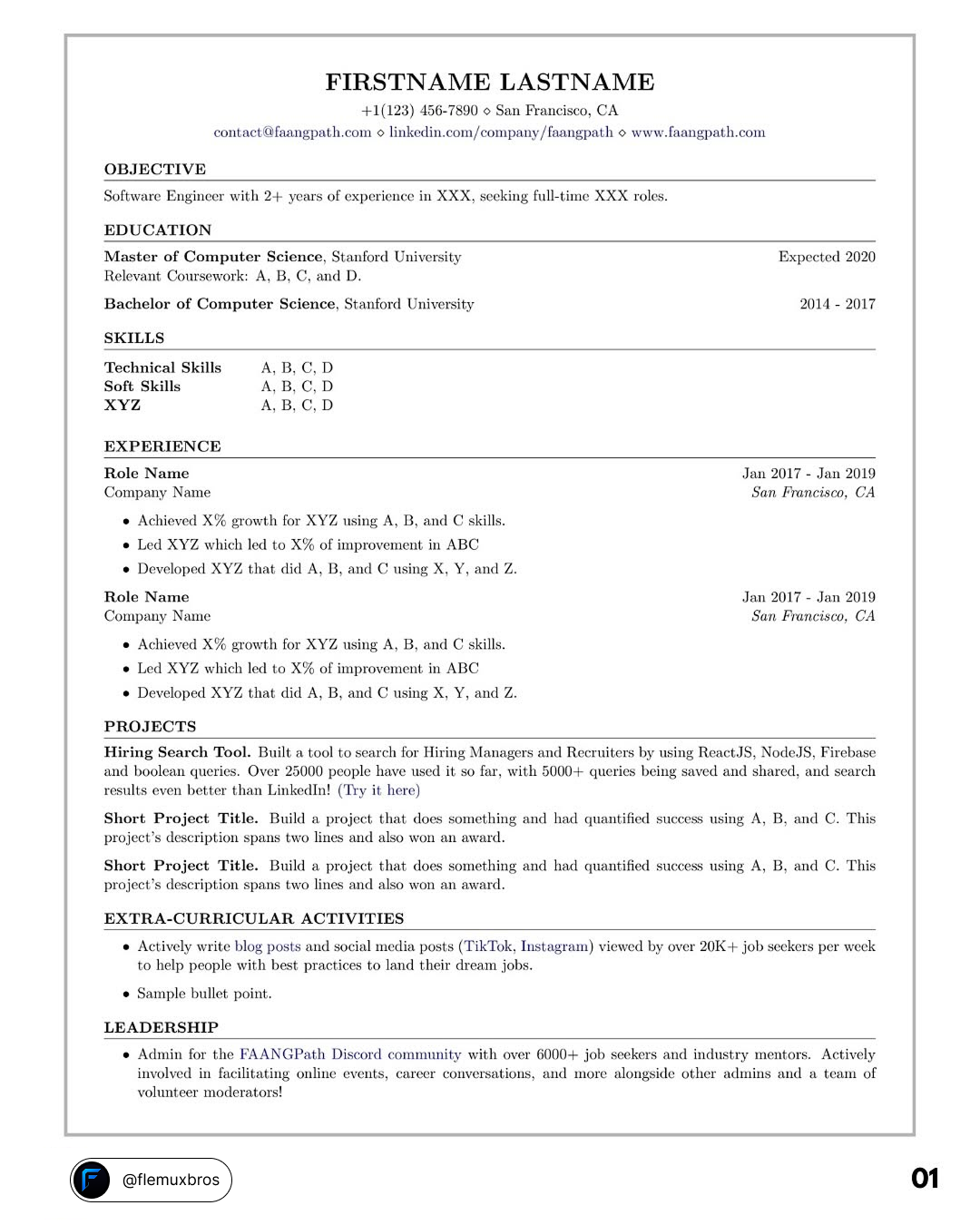
✨ Key Features:
- Clean, single-column layout
- Optimized for software engineering roles
- Maximum white space for easy scanning
- Perfect keyword density zones
- ATS Score: 95%+
📋 What Makes It Stand Out:
- Proven track record with FAANG hiring managers
- Minimal but professional design
- Easy to customize and maintain
- Excellent for both ATS and human readers
🔗 Get This Template: FAANGPath Simple Template on Overleaf
This template is perfect if you're applying to Google, Amazon, Facebook (Meta), Apple, or Netflix. The clean layout ensures your accomplishments and skills are front and center.
2️⃣ Deedy Resume (Reversed)
🎯 Best For: Experienced Professionals, Senior Roles, Creative Tech Positions
The Deedy Resume (Reversed version) offers a two-column layout that maximizes space while maintaining ATS compatibility. It's been battle-tested by thousands of successful applicants.
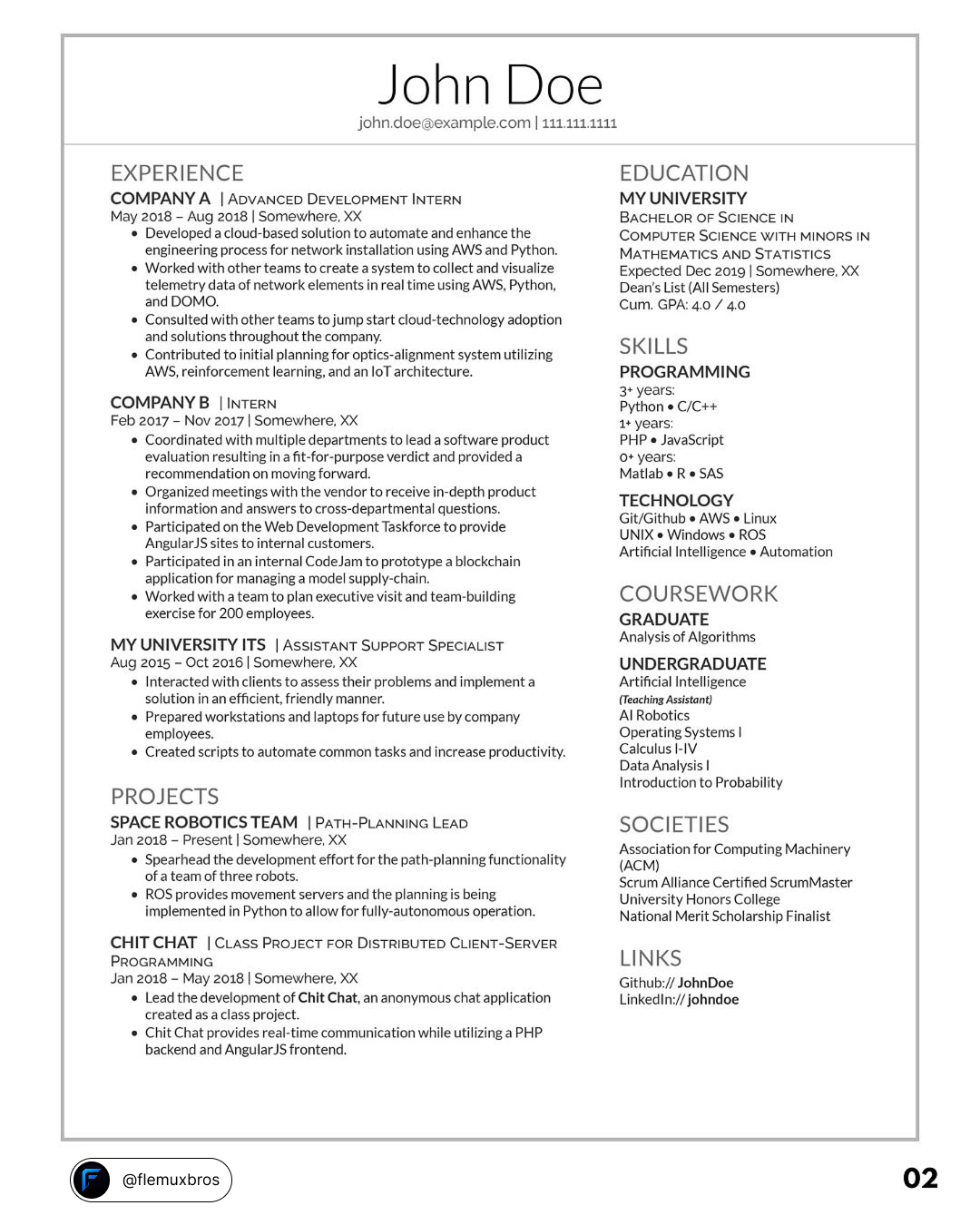
✨ Key Features:
- Smart two-column design
- Compact yet readable format
- Elegant typography
- Optimized section ordering
- ATS Score: 92%+
📋 What Makes It Stand Out:
- Fits more information without looking cluttered
- Professional color accents (ATS-safe)
- Perfect for experienced candidates
- Great balance of style and substance
🔗 Get This Template: Deedy Resume Reversed on Overleaf
While two-column layouts can sometimes cause ATS parsing issues, the Deedy template uses a clean structure that most modern ATS systems handle well. Always test with free ATS checkers before submitting!
3️⃣ RenderCV - EngineeringResumes Theme
🎯 Best For: Engineers, Technical Roles, Academic Positions
RenderCV's Engineering theme is a modern, data-driven approach to resume creation. It's designed with precision and technical accuracy in mind.
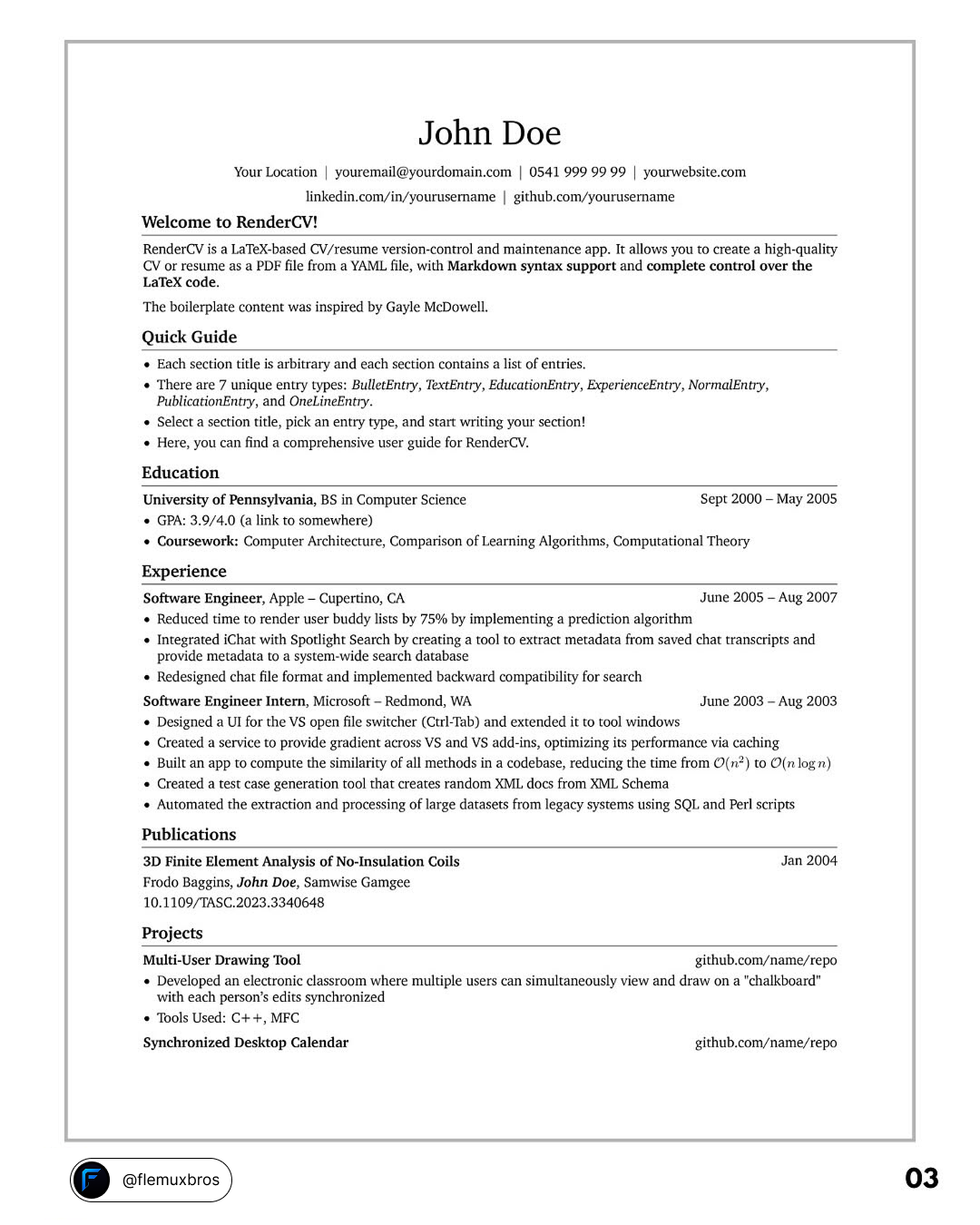
✨ Key Features:
- Engineered for engineering roles
- Precision formatting
- Clean hierarchical structure
- Version-controlled resume generation
- ATS Score: 94%+
📋 What Makes It Stand Out:
- Built by engineers, for engineers
- Automated consistency checks
- Easy to update and maintain
- Perfect for technical documentation style
🔗 Get This Template: RenderCV EngineeringResumes Theme on Overleaf
RenderCV is more than a template — it's a complete system for managing your resume. Perfect for developers who love version control and automation!
4️⃣ Yuan's Resume Template
🎯 Best For: Fresh Graduates, Entry-Level Positions, Interns
Yuan's template is specifically designed for candidates early in their careers. It emphasizes education, projects, and skills over extensive work experience.
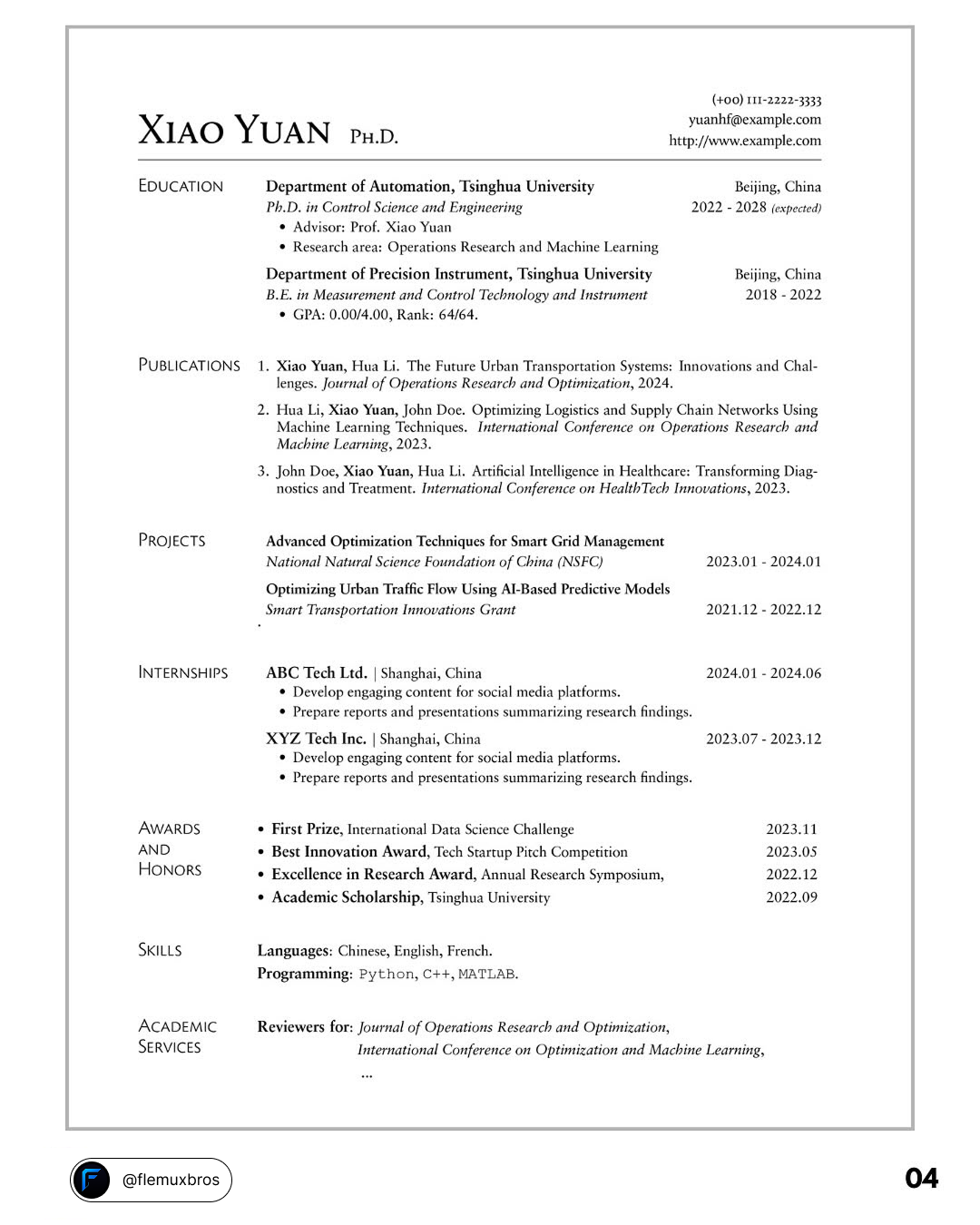
✨ Key Features:
- Student-friendly layout
- Project-focused sections
- Skills matrix integration
- Education emphasis
- ATS Score: 93%+
📋 What Makes It Stand Out:
- Perfect for limited work experience
- Highlights academic achievements
- Shows technical projects effectively
- Clean and approachable design
🔗 Get This Template: Yuan's Resume Template on Overleaf
New graduates: Use this template to showcase your projects, hackathons, coursework, and extracurricular activities. These can be just as impressive as work experience when presented well!
5️⃣ RenderCV - Classic Theme
🎯 Best For: Traditional Industries, Executive Roles, Conservative Fields
The RenderCV Classic theme offers timeless professional styling that works across all industries, especially in more traditional or conservative fields.
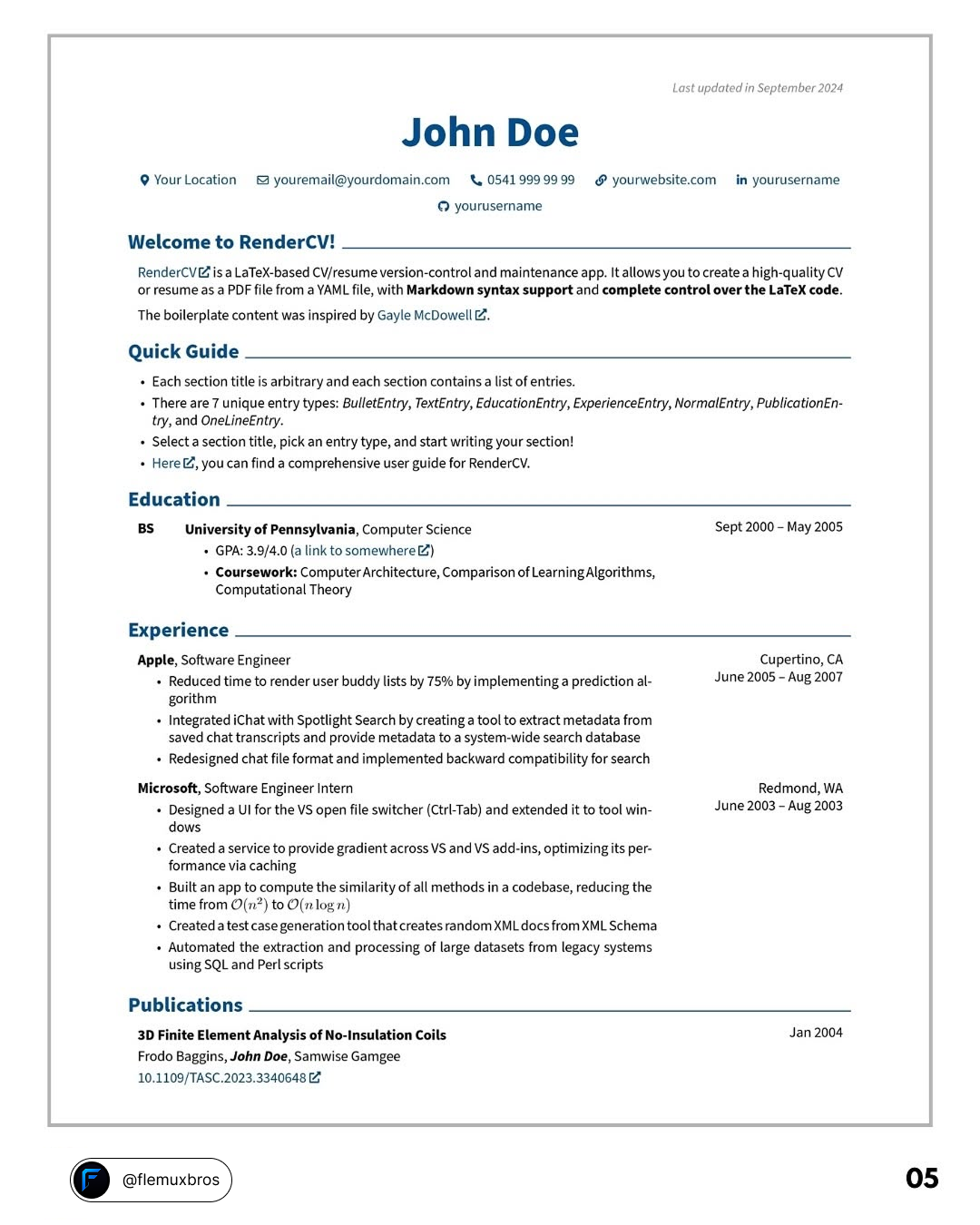
✨ Key Features:
- Traditional professional format
- Industry-agnostic design
- Conservative color scheme
- Proven track record
- ATS Score: 96%+
📋 What Makes It Stand Out:
- Works for ANY industry
- Trusted by executive recruiters
- Maximum ATS compatibility
- Timeless design that won't look dated
🔗 Get This Template: RenderCV Classic Theme on Overleaf
If you're unsure which template to choose, the Classic theme is your safest bet. It's universally accepted across industries and maintains the highest ATS compatibility.
🛠️ How to Choose the Right Template
Don't just pick the prettiest template. Choose based on your industry, experience level, and target companies.
Decision Framework
| Template | Experience Level | Industry | Design Style |
|---|---|---|---|
| FAANGPath Simple | Any | Tech/FAANG | Minimalist |
| Deedy Reversed | 3+ years | Tech/Creative | Modern |
| RenderCV Engineering | Any | Engineering/Tech | Technical |
| Yuan's Template | 0-2 years | Any | Student-Friendly |
| RenderCV Classic | Any | Traditional/All | Conservative |
Questions to Ask Yourself:
✅ What's your experience level?
- Entry-level → Yuan's Template
- Mid-level → FAANGPath or Deedy
- Senior → Deedy or Classic
✅ What industry are you targeting?
- Tech/Startups → FAANGPath, Deedy, RenderCV Engineering
- Finance/Consulting → Classic
- Creative Tech → Deedy
- Engineering → RenderCV Engineering
✅ What's the company culture?
- Modern/Innovative → FAANGPath, Deedy
- Traditional/Corporate → Classic
- Technical/Academic → RenderCV Engineering
📝 Resume Optimization Best Practices
These strategies work regardless of which template you choose. They're the difference between a good resume and a great one.
1. Keyword Optimization
Strategy:
- Read the job description carefully
- Extract key skills and requirements
- Naturally incorporate them into your resume
- Use exact phrases from the job posting
❌ Bad: "Worked on web projects"
✅ Good: "Developed responsive web applications using React and TypeScript"
2. Quantify Your Achievements
Formula: Action Verb + Task + Quantifiable Result
❌ Weak: "Responsible for improving website performance"
✅ Strong: "Optimized website performance, reducing load time by 60% and increasing conversion rate by 25%"
3. Use Strong Action Verbs
Replace weak verbs with powerful ones:
| Weak | Strong |
|---|---|
| Did | Executed, Implemented, Delivered |
| Made | Engineered, Developed, Architected |
| Helped | Facilitated, Coordinated, Enabled |
| Worked on | Spearheaded, Led, Drove |
4. Structure Your Experience
The STAR Method:
- Situation: Context
- Task: Your responsibility
- Action: What you did
- Result: Impact (quantified)
Example:
• Identified performance bottleneck in checkout process (Situation)
  affecting 40% of mobile users (Task)
• Implemented lazy loading and code splitting using React.lazy() (Action)
• Reduced bundle size by 45% and improved mobile conversion by 28% (Result)
🚀 Getting Started with LaTeX Templates
Never used LaTeX before? Don't worry! Overleaf makes it as easy as editing a Google Doc.
Step-by-Step Guide:
1️⃣ Choose Your Template
- Click any template link above
- Opens in Overleaf (free account required)
2️⃣ Customize Your Information
% Personal Information Section
\name{Your Name}
\address{Your City, State}
\phone{(123) 456-7890}
\email{your.email@example.com}
\linkedin{linkedin.com/in/yourprofile}
\github{github.com/yourusername}
3️⃣ Add Your Experience
\section{Experience}
\resumeSubheading
  {Software Engineer}{June 2023 -- Present}
  {Tech Company}{San Francisco, CA}
  \resumeItemListStart
    \resumeItem{Built scalable microservices using Node.js and AWS}
    \resumeItem{Improved API response time by 40\% through optimization}
  \resumeItemListEnd
4️⃣ Compile and Download
- Click "Recompile" to see changes
- Download as PDF
- Test with ATS checker
Pro Tip: Use Overleaf's version history feature to maintain different versions of your resume for different job applications!
🔍 Testing Your Resume for ATS Compatibility
Always test your resume before submitting to ensure it will parse correctly!
Free ATS Testing Tools:
✅ Recommended Checkers:
- Jobscan - Compares your resume to job descriptions
- Resume Worded - Free ATS-friendly score
- TopResume - Free basic ATS review
- VMock - AI-powered feedback
What to Check:
- ✅ All text is selectable/copyable
- ✅ Section headings are recognized
- ✅ Dates and company names parse correctly
- ✅ Skills are properly extracted
- ✅ Education information is captured
- ✅ No critical information in headers/footers
💼 Industry-Specific Tips
💻 Tech & Software Engineering
Must-Have Sections:
- Technical Skills (languages, frameworks, tools)
- Projects (with GitHub links)
- Relevant coursework or certifications
Keywords to Include:
- Programming languages you know
- Frameworks and technologies
- Methodologies (Agile, Scrum, etc.)
- Cloud platforms (AWS, Azure, GCP)
🎨 Design & Creative
Must-Have Sections:
- Portfolio link (prominently displayed)
- Tools & Software proficiency
- Design projects with metrics
ATS-Safe Creativity:
- Use subtle color (one accent color)
- Clean typography hierarchy
- Professional layout
- Include portfolio link in text format
📊 Business & Finance
Must-Have Sections:
- Certifications (CPA, CFA, etc.)
- Quantified achievements
- Industry-specific software
Keywords to Include:
- Specific financial software/tools
- Regulatory knowledge
- Analytical skills
- Industry terminology
🎓 Special Section: Resume Mistakes to Avoid
These errors can get your resume automatically rejected — even if you're perfectly qualified!
❌ Top 10 Resume Mistakes:
-
Using tables for layout
- ATS can't parse them correctly
- Use clean sections instead
-
Fancy graphics or images
- ATS can't read images
- Stick to text-based design
-
Multiple columns (in most cases)
- Some ATS read left-to-right, not column-by-column
- Test thoroughly if using two columns
-
Creative section names
- "My Journey" instead of "Experience"
- ATS looks for standard headings
-
Spelling errors
- Instant disqualification
- Use spell-check + human review
-
Inconsistent formatting
- Different date formats
- Varying bullet styles
- Inconsistent spacing
-
Lying or exaggerating
- Easy to verify during interviews
- Can lead to termination later
-
Too long (more than 2 pages for most roles)
- 1 page for less than 10 years experience
- 2 pages for 10+ years
-
Missing keywords
- Won't match job requirements
- Read job description carefully
-
Generic objective statements
- Use summary or skip entirely
- Focus on value you bring
📈 Resume Optimization Checklist
Use this checklist before submitting any application to maximize your chances!
✅ Pre-Submission Checklist:
Content:
- Tailored to specific job description
- Includes keywords from job posting
- All achievements are quantified
- Action verbs used throughout
- No typos or grammatical errors
- Contact information is current
- LinkedIn profile is updated
Format:
- Clean, ATS-friendly template
- Standard section headings
- Consistent formatting throughout
- Proper file format (.pdf or .docx)
- File named professionally (FirstName_LastName_Resume.pdf)
- Tested with ATS checker tool
- Prints well on paper
Technical:
- All text is selectable
- No headers/footers with critical info
- Standard fonts used
- Proper bullet points (not symbols)
- Dates formatted consistently
- Links are text-based, not just clickable
🌟 Success Stories
These templates have helped thousands of candidates land their dream jobs. Here are just a few examples:
💬 What Users Say:
"Got 3 FAANG interviews within 2 weeks"
"Used the FAANGPath template and updated my resume with quantified achievements. Got interview calls from Google, Amazon, and Microsoft within two weeks!"
— Sarah K., Software Engineer
"90% ATS score on first try"
"Switched to the RenderCV Classic template and tested with Jobscan. Went from 67% to 93% ATS match score immediately!"
— Marcus T., Data Analyst
"Perfect for fresh graduates"
"Yuan's template helped me showcase my projects and coursework effectively. Landed my first job at a top startup!"
— Jennifer L., Recent Graduate
🎯 Next Steps: Your Action Plan
Don't just read this guide — take action! Here's your roadmap to resume success:
Week 1: Foundation
- Day 1-2: Choose your template based on industry/level
- Day 3-4: Gather your information (experience, projects, skills)
- Day 5: Set up Overleaf account and open your chosen template
- Day 6-7: Customize template with your information
Week 2: Optimization
- Day 1-2: Research target job descriptions
- Day 3-4: Add keywords and quantified achievements
- Day 5: Test with ATS checker tools
- Day 6: Get feedback from peers or mentors
- Day 7: Final revisions and polish
Week 3: Launch
- Day 1: Create multiple versions for different roles
- Day 2-7: Start applying to positions
- Ongoing: Track applications and update resume based on feedback
💡 Bonus Resources
📚 Additional Learning:
Free Resources:
- r/resumes - Reddit community for resume feedback
- Resume Worded - Free resume analyzer
- Grammarly - Catch writing mistakes
- Hemingway Editor - Make your writing clearer
Recommended Reading:
- "Cracking the Coding Interview" - Gayle Laakmann McDowell
- "The Google Resume" - Gayle Laakmann McDowell
- LinkedIn Learning courses on resume writing
🛠️ Useful Tools:
| Tool | Purpose | Cost |
|---|---|---|
| Overleaf | LaTeX editing | Free |
| Jobscan | ATS optimization | Free tier available |
| Grammarly | Grammar checking | Free tier available |
| Canva | Visual inspiration | Free tier available |
| LinkedIn Resume Builder | Quick resume creation | Free |
🎬 Final Thoughts
Your resume is your first impression in the job market. In a world where 75% of resumes never reach human eyes due to ATS filtering, having an optimized, professional resume isn't optional — it's essential.
You now have access to the best ATS-friendly resume templates and the knowledge to use them effectively. The only thing left is to take action!
Remember:
✅ Choose the right template for your industry and experience level
✅ Optimize with keywords from job descriptions
✅ Quantify your achievements with numbers
✅ Test with ATS checkers before submitting
✅ Customize for each application
✅ Keep it simple, clean, and professional
The perfect job is out there waiting for you. With these templates and strategies, you're now equipped to create a resume that will get you noticed.
📞 Get Help & Stay Updated
Need personalized resume help or career advice? We're here to support you!
Connect with us:
📧 Email: flemuxstudio@gmail.com
📞 Phone: +91 62899 98072
🌐 Website: flemuxstudio.com
Share this guide with friends who are job hunting — good karma comes back around!
📢 Your Turn
- Which template are you going to use?
- What's your biggest resume challenge?
- Have success stories to share?
Drop a comment below or reach out directly. We love hearing from our readers!
Good luck with your job search! 🚀
Remember: A great resume opens doors, but your skills, personality, and passion get you hired. Use these templates as tools, not crutches. Your unique story and value are what truly matter.
Now go get that dream job! 💼✨