Need a beautiful portfolio website to showcase your work? Our vCard Personal Portfolio Template is perfect for you! It's free, easy to use, and looks great on all devices.
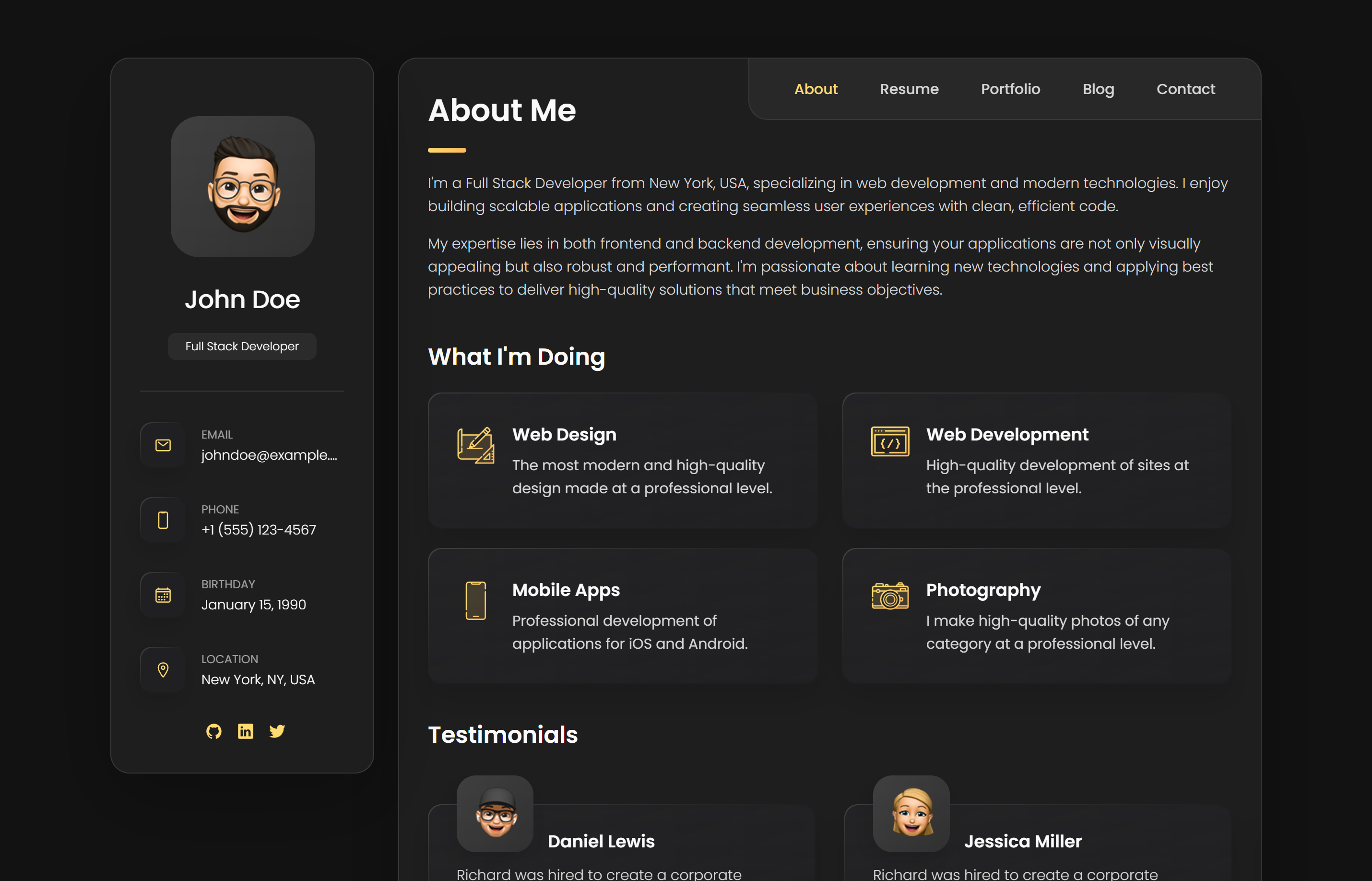
✅ Ready-to-use website files (HTML, CSS, JavaScript)
✅ Works on phones, tablets, and computers
✅ Cool animations and effects
✅ Easy to change colors and content
✅ Works in all web browsers
🌟 Why This Template is Great
This portfolio template has everything you need to create an awesome personal website:
📱 Works on All Devices
- Looks perfect on phones, tablets, and computers
- Easy to navigate with touch or mouse
- Images load quickly
- Everything fits nicely on any screen size
🎨 Beautiful Design
- Clean and professional look
- Smooth animations that catch the eye
- Colors that work for any profession
- Easy-to-read fonts
⚡ Fast and Reliable
- Small file size (loads super fast)
- Good for search engines like Google
- Clean, organized code
� Get Started Now
Get the complete source code and start building your portfolio today!
📥 Download Source Code (Free)
Want to see it in action first? Check out the live demo!
🔗 View Live Demo
�🔧 Template Structure
The template follows modern web development best practices with a clean, organized file structure.
File Organization
vCard-personal-portfolio/
├── index.html              # Main HTML file
├── assets/
│   ├── css/
│   │   └── style.css      # All styles in one file
│   ├── js/
│   │   └── script.js      # Interactive functionality
│   └── images/            # Portfolio images
├── README.md              # Setup instructions
└── website-demo-image/    # Preview images
Key Sections
- Hero Section - Eye-catching introduction with your photo and title
- About - Professional summary and skills showcase
- Resume - Education and work experience timeline
- Portfolio - Gallery of your best work
- Blog - Latest articles and insights
- Contact - Multiple ways to get in touch
🎨 Easy Customization
Change Colors
Want different colors? Just change these simple settings:
/* Change these colors to match your style */
:root {
  --main-color: #ffdb70;      /* Yellow accent color */
  --second-color: #ff6b6b;    /* Red accent color */
  --text-color: #2d3748;      /* Dark text */
  --background: #ffffff;       /* White background */
}
Add Hover Effects
/* Make cards lift up when you hover over them */
.card:hover {
  transform: translateY(-5px);  /* Moves up 5 pixels */
  box-shadow: 0 10px 30px rgba(0,0,0,0.1);  /* Adds shadow */
}
Make a Grid Layout
/* Arrange portfolio items in a nice grid */
.portfolio-grid {
  display: grid;
  grid-template-columns: repeat(auto-fit, minmax(300px, 1fr));
  gap: 2rem;
}
⚡ Cool Interactive Features
Smooth Scrolling
When someone clicks a menu link, the page smoothly scrolls to that section:
// This makes clicking menu links scroll smoothly
document.querySelectorAll('a[href^="#"]').forEach(link => {
  link.addEventListener('click', function (e) {
    e.preventDefault();
    const section = document.querySelector(this.getAttribute('href'));
    if (section) {
      section.scrollIntoView({
        behavior: 'smooth'
      });
    }
  });
});
Typing Animation
This creates a cool typing effect where text appears letter by letter:
// Creates typing animation effect
function createTypingEffect() {
  const element = document.querySelector('.typing-text');
  const words = ['Web Developer', 'Designer', 'Freelancer'];
  let wordIndex = 0;
  let letterIndex = 0;

  function type() {
    if (letterIndex < words[wordIndex].length) {
      element.textContent += words[wordIndex][letterIndex];
      letterIndex++;
      setTimeout(type, 100);
    } else {
      setTimeout(erase, 2000);
    }
  }

  function erase() {
    if (letterIndex > 0) {
      element.textContent = words[wordIndex].substring(0, letterIndex - 1);
      letterIndex--;
      setTimeout(erase, 50);
    } else {
      wordIndex = (wordIndex + 1) % words.length;
      setTimeout(type, 500);
    }
  }

  type(); // Start the animation
}

// Start when page loads
document.addEventListener('DOMContentLoaded', createTypingEffect);
🎯 How to Use This Template
Don't worry if you're new to coding! These steps are super easy to follow.
Step 1: Download and Setup
- Download the ZIP file from the button above
- Extract the files to a folder on your computer
- Open the
index.htmlfile in your web browser - You'll see your new portfolio website!
Step 2: Add Your Information
- Open
index.htmlin a text editor (like Notepad) - Replace the demo text with your own information:
- Change "John Doe" to your name
- Add your own photo
- Update the skills and experience sections
- Add your contact information
Step 3: Customize Colors
- Open
style.css - Find the color section at the top
- Change the color codes to your favorite colors
- Save and refresh your browser to see changes
🌈 Change Colors to Match Your Style
Pick colors that represent you! Here are some popular combinations:
| Style | Main Color | Accent Color | Perfect For |
|---|---|---|---|
| Creative | Yellow (#ffdb70) | Red (#ff6b6b) | Artists, Designers |
| Professional | Blue (#2563eb) | Dark Blue (#1e40af) | Business, Corporate |
| Tech | Green (#10b981) | Dark Green (#059669) | Developers, IT |
| Minimal | Gray (#6b7280) | Dark Gray (#4b5563) | Clean, Simple look |
📱 Works Everywhere
Your website will look great on any device or browser!
Where It Works
- ✅ Phones (iPhone, Android)
- ✅ Tablets (iPad, etc.)
- ✅ Computers (Windows, Mac, Linux)
- ✅ All Browsers (Chrome, Firefox, Safari, Edge)
- ES6+ JavaScript
- Intersection Observer API
- CSS3 Animations
️ Advanced Features
Contact Form Integration
The template includes a ready-to-use contact form that can be easily connected to various form handling services:
<!-- Contact Form -->
<form class="contact-form" action="https://formspree.io/your-email" method="POST">
  <div class="form-group">
    <input type="text" name="name" placeholder="Your Name" required>
  </div>
  <div class="form-group">
    <input type="email" name="email" placeholder="Your Email" required>
  </div>
  <div class="form-group">
    <textarea name="message" placeholder="Your Message" rows="5" required></textarea>
  </div>
  <button type="submit" class="btn btn-primary">Send Message</button>
</form>
SEO Optimization
<!-- SEO Meta Tags -->
<meta name="description" content="Professional portfolio of [Your Name] - Web Developer & Designer">
<meta name="keywords" content="web developer, portfolio, design, frontend">
<meta name="author" content="Your Name">

<!-- Open Graph -->
<meta property="og:title" content="Your Name - Portfolio">
<meta property="og:description" content="Professional web developer and designer">
<meta property="og:image" content="assets/images/og-image.jpg">
<meta property="og:url" content="https://yourwebsite.com">

<!-- Schema Markup -->
<script type="application/ld+json">
{
  "@context": "https://schema.org",
  "@type": "Person",
  "name": "Your Name",
  "jobTitle": "Web Developer",
  "url": "https://yourwebsite.com"
}
</script>
📈 Performance Tips
Follow these tips to make your portfolio lightning fast!
Image Optimization
- Use WebP format for better compression
- Lazy load images below the fold
- Optimize image sizes for different screen densities
Code Optimization
- Minify CSS and JavaScript for production
- Remove unused CSS with tools like PurgeCSS
- Use a CDN for faster asset delivery
Loading Performance
// Lazy Loading Images
const lazyImages = document.querySelectorAll('img[data-src]');
const imageObserver = new IntersectionObserver((entries, observer) => {
  entries.forEach(entry => {
    if (entry.isIntersecting) {
      const img = entry.target;
      img.src = img.dataset.src;
      img.classList.remove('lazy');
      observer.unobserve(img);
    }
  });
});

lazyImages.forEach(img => imageObserver.observe(img));
🎨 Design Variations
Dark Mode Version
/* Dark Mode Styles */
[data-theme="dark"] {
  --primary-color: #64ffda;
  --secondary-color: #ff6b9d;
  --text-color: #e2e8f0;
  --bg-color: #1a202c;
  --card-bg: #2d3748;
}

/* Dark Mode Toggle */
.theme-toggle {
  position: fixed;
  top: 20px;
  right: 20px;
  background: var(--primary-color);
  border: none;
  border-radius: 50%;
  width: 50px;
  height: 50px;
  cursor: pointer;
  transition: transform 0.3s ease;
}
Animated Background
/* Animated Gradient Background */
.hero::before {
  content: '';
  position: absolute;
  top: 0;
  left: 0;
  right: 0;
  bottom: 0;
  background: linear-gradient(-45deg, #ee7752, #e73c7e, #23a6d5, #23d5ab);
  background-size: 400% 400%;
  animation: gradientAnimation 15s ease infinite;
  opacity: 0.1;
}

@keyframes gradientAnimation {
  0% { background-position: 0% 50%; }
  50% { background-position: 100% 50%; }
  100% { background-position: 0% 50%; }
}
🚀 Deployment Options
Deploy your portfolio to any of these platforms for free!
Free Hosting Options
-
GitHub Pages
- Push to GitHub repository
- Enable Pages in settings
- Your site is live!
-
Netlify
- Drag and drop your files
- Automatic deployments
- Custom domain support
-
Vercel
- Import from GitHub
- Instant global CDN
- Analytics included
-
Surge.sh
- Command line deployment
- Custom domains
- Simple and fast
Quick Deployment Commands
# GitHub Pages
git add .
git commit -m "Deploy portfolio"
git push origin main

# Netlify CLI
npm install -g netlify-cli
netlify deploy --prod --dir=.

# Surge.sh
npm install -g surge
surge . your-domain.surge.sh
💡 Customization Ideas
Personal Branding
- Add your personal logo to the navigation
- Create a custom favicon that represents you
- Use your brand colors throughout the design
- Include your personal tagline or motto
Interactive Elements
- Parallax scrolling effects
- Hover animations on portfolio items
- Loading animations for page transitions
- Scroll progress indicator
Content Sections
- Testimonials from clients or colleagues
- Skills timeline showing your learning journey
- Blog integration for sharing insights
- Achievement badges and certifications
🔧 Troubleshooting
Having trouble? Here are solutions to common problems.
Images Not Loading
// Check if images exist
const images = document.querySelectorAll('img');
images.forEach(img => {
  img.onerror = function() {
    this.src = 'assets/images/placeholder.jpg';
  };
});
Animations Not Working
- Ensure JavaScript is enabled
- Check browser console for errors
- Verify CSS animation support
Mobile Display Issues
- Test viewport meta tag
- Check responsive breakpoints
- Validate touch event handling
🤝 Need Help?
Don't worry if you get stuck! We have lots of ways to help you succeed.
Free Help Available
- Easy Setup Guide - Step-by-step instructions included
- Video Tutorials - Watch how to customize everything
- Community Support - Ask questions and get answers
Professional Services
- Custom Design - We can create a unique design just for you
- Personal Setup - We'll set everything up for you
- Ongoing Support - Keep your website updated and secure
Ready to start? Download the template above and begin building your amazing portfolio!
📞 Contact Us
Need custom help or have questions?
📧 Email: flemuxstudio@gmail.com
📞 Phone: +91 62899 98072
🌐 Website: flemuxstudio.com
Want us to customize everything for you? Let's chat!
📅 Schedule a Consultation
Happy building! 🚀 Your awesome portfolio is just a download away!